Blocking & Non-Blocking Code in Node.js

JavaScript is a single-threaded language, meaning it executes code on one main thread. Node.js achieves asynchronous behavior not by making JavaScript multi-threaded, but by leveraging libuv which adds up the async behavior with event loop and thread pool .
We’re going to understand Blocking & Non-Blocking code in Node.js.
Before going into the blog, Node.js is an open-source, cross-platform JavaScript runtime environment that allows developers to execute JavaScript code outside of a web browser, primarily for server-side and networking applications. Node.js operates using an event-driven, non-blocking I/O model. It is not a programming language or a framework itself, but rather a runtime that provides the necessary environment and core libraries to run JavaScript on a server, operating system, or command line.
Now that we both have a base idea of what is Node.js, we can start exploring the blog below .
What Blocking Code Means
Blocking code means the program must wait for one task to finish before moving to the next task. Now it may sound good because that’s how it should be, but no honestly it depends on our requirement. During this waiting time, nothing else can happen.
Real-Life Analogy — One Cashier Shop
Imagine a shop with only one cashier. A customer comes with a huge order.
While the cashier is handling that customer:
everyone else must wait
no new customer is served
the line becomes slow
That is exactly how blocking code works.
// Example

const fs = require("fs");
console.log("Start");
const data = fs.readFileSync("demo.txt", "utf8"); // reading file
console.log(data);
console.log("End");

// Output
Start
File Content Here
End
Here readFileSync blocks the execution. The server cannot continue until the task finishes.
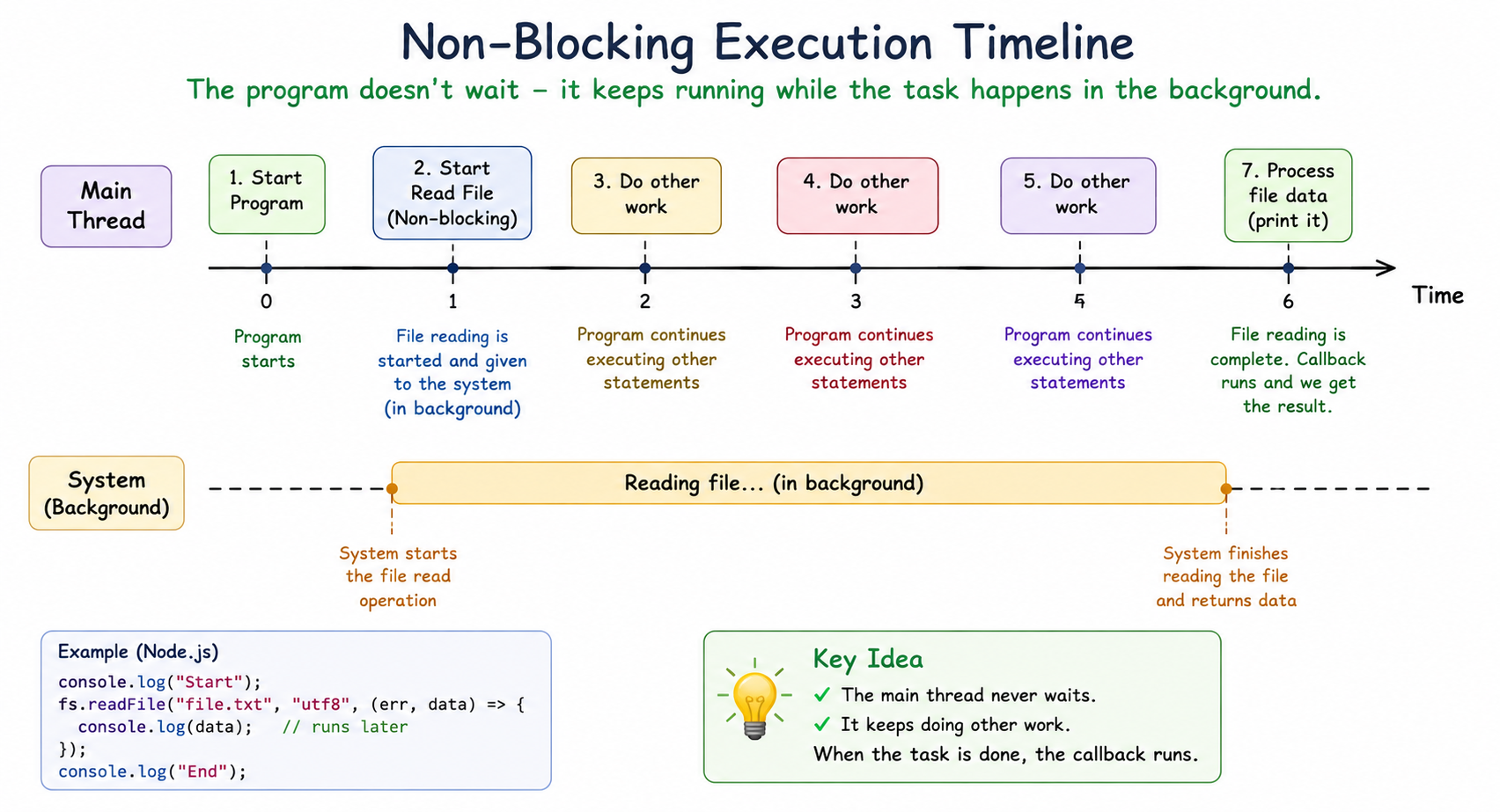
Now let’s see Non-blocking code
What Non-Blocking Code Means
Non-blocking code means the program starts a task and immediately continues doing other work without waiting. When the task finishes, Node.js handles the result later.
Real-Life Analogy — Smart Waiter Imagine a waiter in a restaurant. The waiter:
takes your order
gives it to the kitchen
immediately serves other tables The waiter does NOT stand near the kitchen waiting. When the food is ready, the kitchen notifies the waiter. That is how non-blocking Node.js works.
Example in Node.js
const fs = require("fs");
console.log("Start");
const data = fs.readFileAsync("demo.txt", "utf8");
console.log(data);
console.log("End");

// output
Start
End
File Content Here
The application did NOT wait. This is non-blocking behavior
Difference Between Blocking and Non-Blocking Code
Blocking Code | Non-Blocking Code |
Waits for the current task to finish before moving to the next task. | Code starts the task and moves to the next task without waiting. |
The program execution stops until the operation is completed. | The program execution continues while the operation runs in the background. |
Can make the application slow if a task takes too much time. | Code keeps the application fast and responsive. |
Other users or requests must wait until the current task finishes. | Multiple users or requests can be handled at the same time. |
It is mostly used with synchronous functions. | It is mostly used with asynchronous functions. |
Blocking operations can freeze the Node.js event loop. | Non-blocking operations keep the event loop free. |
Example: fs.readFileSync() | Example: fs.readFile() |
Why Blocking Slows Server
This is where things become very important. Blocking code slows servers and to prevent this, Node.js uses a single main thread and an event loop, etc
Imagine This Scenario
Suppose 100 users visit your website.
Each request needs to:
read a file
fetch data from database
call an API
With Blocking code like readfilesync
User 1 requests start
file reading starts
User 2 wait
User 3 waits …
so on...
One slow operation blocks everyone.
With Non-blocking code, like fs.readFile
User 1 requests starts
file reading in background
server handles User 2
then server handles User 3
so on..
This makes Node.js highly scalable.
Async Operations in Node.js
Async operations means a task happens independently while the main program keeps running. These tasks keep on running behind the scenes and when finished, it then executes.
Node.js uses async operations for:
file handling
database queries
API calls
timers
network requests
Conclusion
Blocking and non-blocking code are very important concepts in Node.js. Blocking code waits for a task to finish before moving forward, while non-blocking code allows other tasks to continue running without waiting.
Because Node.js uses a single-threaded event loop, non-blocking operations help applications stay fast, responsive, and scalable. This is why most modern Node.js applications use asynchronous methods like callbacks, promises, and async/await.
Understanding these concepts will help you write better backend applications and improve server performance in real-world projects.


