What is Node.js? JavaScript on the Server Explained

JavaScript is one of the most popular programming languages used by developers worldwide. It is a scripting language mainly used for adding interactions and dynamic behavior to websites. Earlier, JavaScript could only run inside web browsers. But nowadays, we can also run JavaScript outside the browser.
So, in this blog, we are going to understand how JavaScript runs outside the browser with the help of Node.js. We will also learn about the working and internals of Node.js in simple and beginner-friendly words. Without wasting any more time, let’s get started.
What is Node.js
Node.js is a cross-platform, open-source JavaScript runtime environment that allows developers to execute JavaScript code outside the web browser. It was initially created by Ryan Dahl in 2009 and is currently maintained by the OpenJS Foundation.
Now, “cross-platform” means it can run on operating systems like Windows, Linux, and macOS.
“Runtime environment” means Node.js is not a programming language or a framework. Instead, it is an environment that allows JavaScript code to execute outside the browser.
Node.js is also open-source, meaning its source code is publicly available on GitHub. Because of this, developers were able to create other JavaScript runtimes such as Deno and Bun.
Why Node.js was Made
Remember I told you earlier that developers were not able to run JavaScript code outside the browser?
That is where Node.js and other JavaScript runtimes came in.
Earlier, JavaScript was mainly used for client-side development because browsers were the only environment where JavaScript could run. On the server side, developers used technologies like Java, PHP, Ruby, and Python for backend development. This created a situation where developers had to use different programming languages for frontend and backend development.
Node.js solved this problem by allowing JavaScript to run outside the browser. Because of this, developers were able to write server-side code using JavaScript as well. This enabled full-stack development using a single programming language.
How Node.js was Made
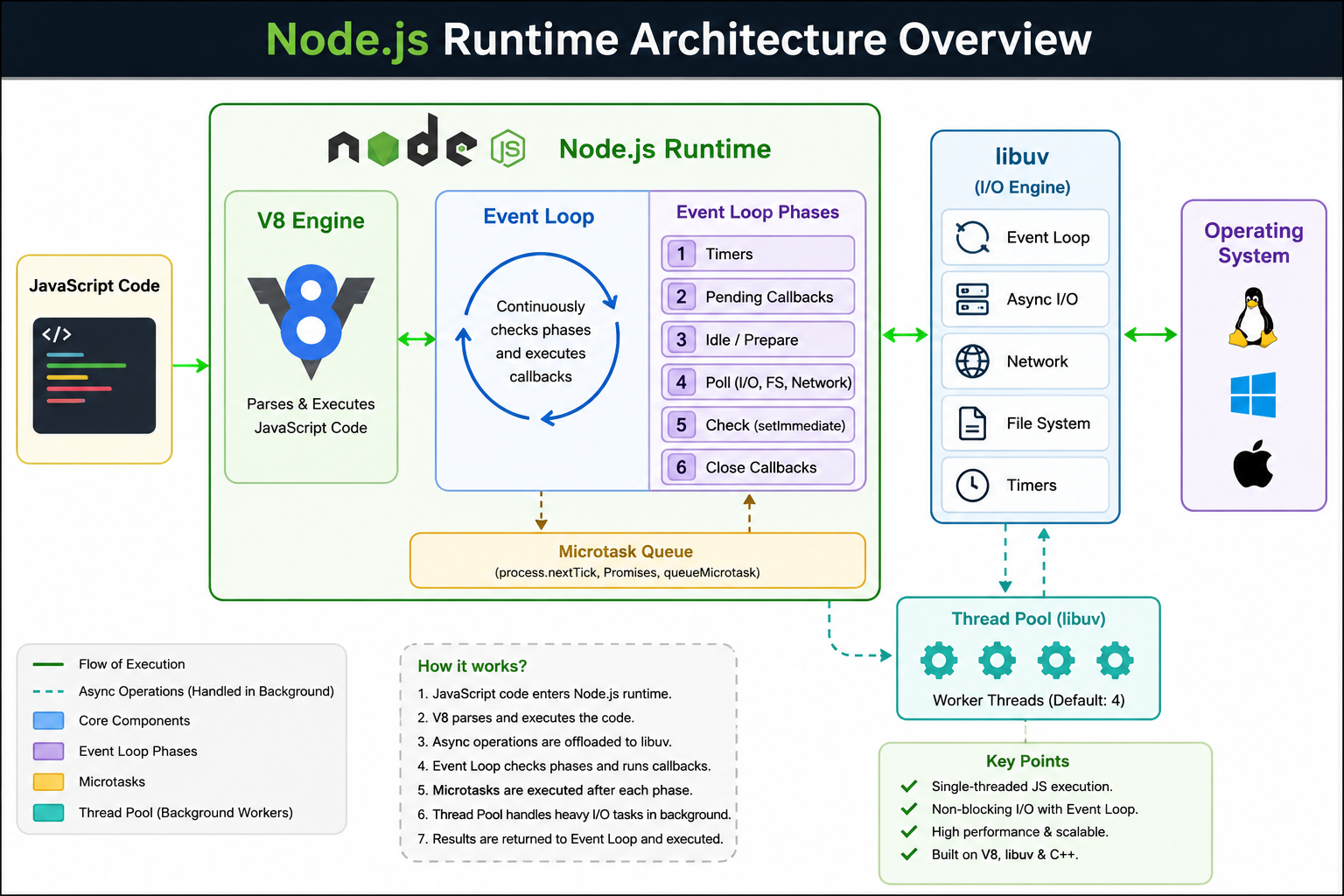
Node.js was created by Ryan Dahl. Internally, Node.js is built using the combination of:
V8 Engine
libuv
C/C++
These components work together to make JavaScript run outside the browser efficiently.
V8 Engine
A web browser contains many components, and one of them is a JavaScript engine that helps the browser understand and execute JavaScript code.
Google Chrome uses a JavaScript engine called V8. V8 is responsible for parsing and executing JavaScript code. It converts JavaScript into machine code so the computer can execute it very quickly.
The browser also provides things like:
DOM
Web APIs
fetch()
setTimeout()
All these together form the browser runtime environment.
Different browsers use different JavaScript engines:
Chrome → V8
Firefox → SpiderMonkey
Safari → JavaScriptCore (Nitro)
Node.js uses Chrome’s V8 engine to execute JavaScript outside the browser.
Libuv
libuv is a multi-platform C library used inside Node.js. It provides important features such as:
Event loop
Asynchronous I/O
Thread pool
File system operations
Networking support
libuv is one of the main reasons Node.js can perform non-blocking asynchronous operations efficiently.
You can think of libuv as the component that helps Node.js interact with the operating system and manage asynchronous tasks behind the scenes.
C/C++ in Node.js
A large part of Node.js is written in C and C++ because operating systems cannot directly understand JavaScript code. Operating systems mainly work with low-level machine instructions.
The V8 engine itself is also written in C++. Node.js uses C/C++ code as a bridge between:
V8 Engine
Operating System
System-level APIs
This allows JavaScript code to interact with files, Network, Processes, Operating system features efficiently.
JavaScript Code
       ↓
     Node.js
 ┌─────────────┐
 │     V8      │ → Executes JS
 │    libuv    │ → Handles async operations
 │    C/C++    │ → Communicates with OS
 └─────────────┘
       ↓
Operating System
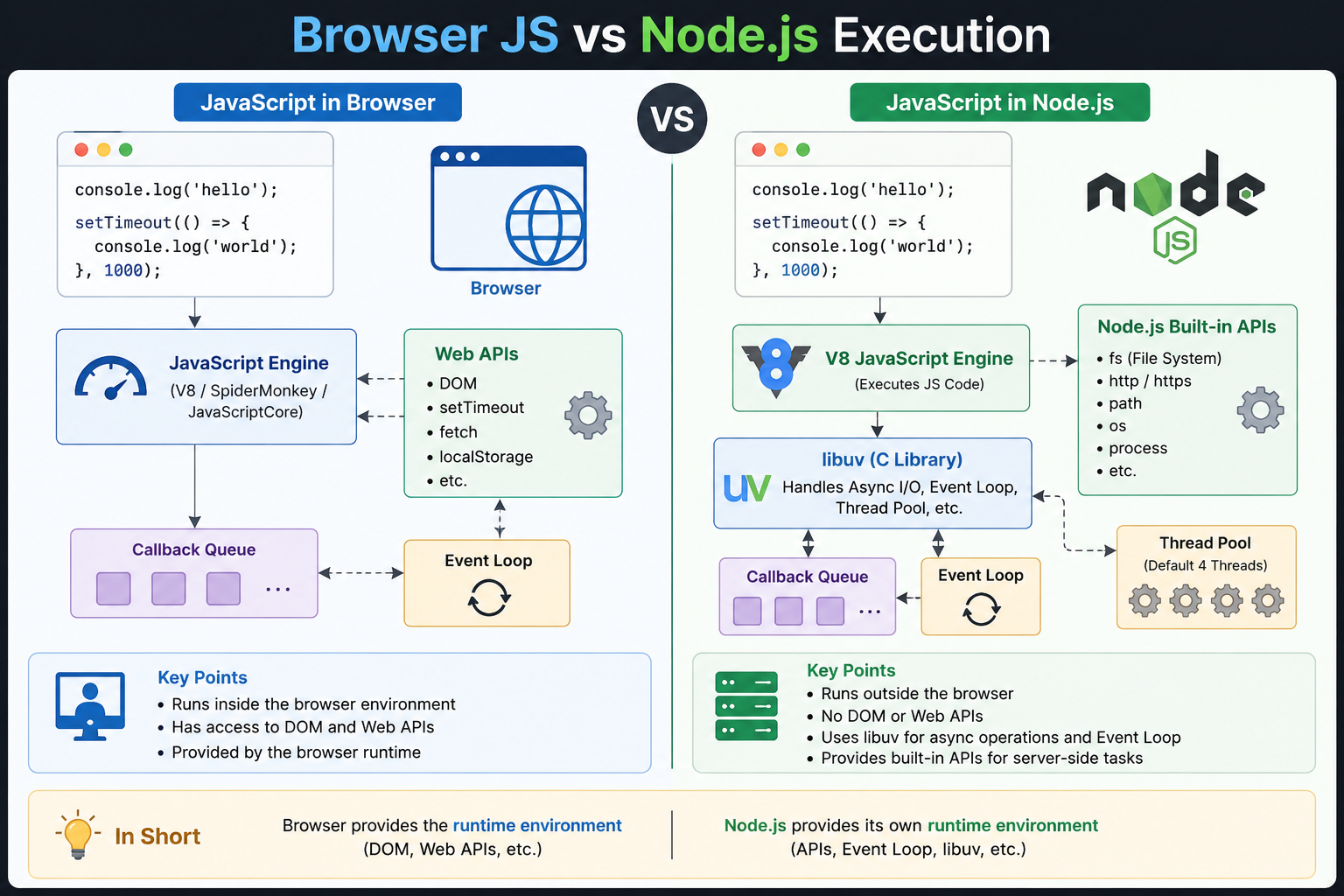
Difference Between JavaScript Running in Browser vs Node.js
Now, for example, if we write:
console.log("hello");
inside the browser console or run the same code in the Node.js environment, the output will be the same. Both will print:
hello
From the outside, the code looks exactly the same. However, internally, the mechanism used to execute the code is completely different.
In browsers, JavaScript code runs inside the browser’s JavaScript runtime environment. The browser provides features like:
DOM
Web APIs
window
document
along with its JavaScript engine.
In Node.js, JavaScript runs inside the Node.js runtime environment, which provides:
File system APIs
Networking APIs
Process handling
Event loop
libuv features
instead of browser APIs.
Although both environments execute JavaScript, they provide completely different features and capabilities.
The syntax of JavaScript remains mostly the same in both environments. That is why developers can write familiar JavaScript code in Node.js without learning an entirely new language.
How JavaScript Runs in Node.js
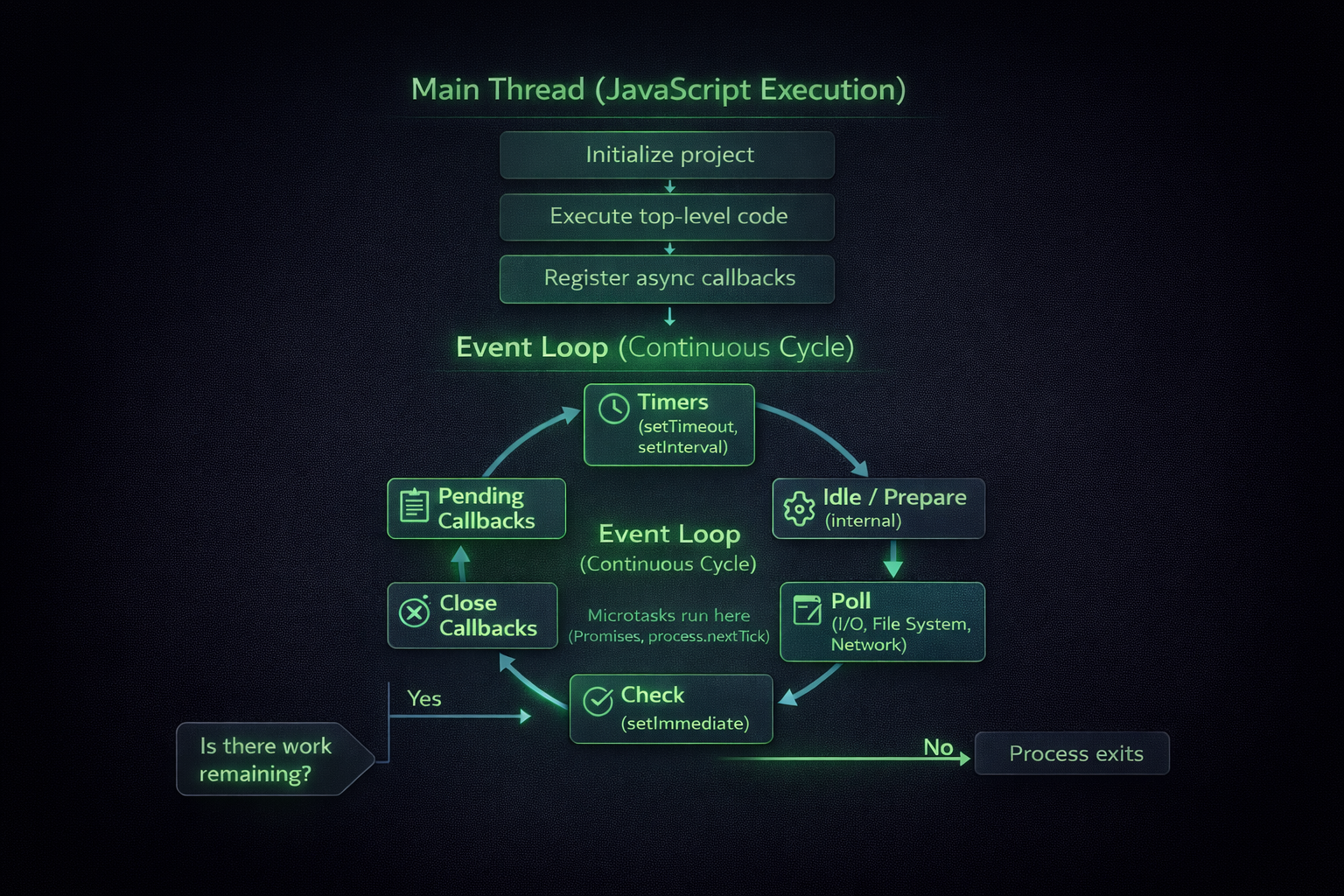
Now we are going to understand how JavaScript code actually runs behind the scenes in Node.js. Don’t worry — the concept is not as complex as it looks.
    +--------------------------------------------------+
    |              MAIN THREAD (JS)                    |
    +--------------------------------------------------+
    |     1. Initialize project                        |
    |     2. Execute top-level code                    |
    |     3. Register async callbacks                  |
    +--------------------------------------------------+
                     |
                     v
        +-----------------------------+
        |       EVENT LOOP START      |
        +-----------------------------+
                     |
                     v
        +------------------------------+
        |       while (work exists)    |
        +------------------------------+
                     |
                     v
        +-----------------------------+
        | 1. Timers                   |
        | (setTimeout, setInterval)   |
        +-----------------------------+
                     |
                     v
        +-----------------------------+
        | 2. Pending Callbacks        |
        +-----------------------------+
                     |
                     v
        +-----------------------------+
        | 3. Idle / Prepare           |
        | (internal)                  |
        +-----------------------------+
                     |
                     v
        +-----------------------------+
        | 4. Poll Phase               |
        | (I/O, fs, network)          |
        +-----------------------------+
                     |
                     v
        +-----------------------------+
        | 5. Check Phase              |
        | (setImmediate)              |
        +-----------------------------+
                     |
                     v
        +-----------------------------+
        | 6. Close Callbacks          |
        +-----------------------------+
                     |
                     v
        +-----------------------------+
        | Run Microtasks              |
        | (Promise, nextTick)         |
        +-----------------------------+
                     |
                     v
        +-----------------------------+
        |   Work remaining?           |
        +-----------------------------+
             | Yes           | No
             v               v
      (Loop continues)   (Process exits)
When a Node.js program starts, it first executes the top-level code. Top-level code means the code written outside functions and callbacks, such as:
Variable declarations
console.log()
Importing modules
Function definitions
Example :
console.log("Start");

const name = "Mehtab";

setTimeout(() => {
  console.log("Timer completed");
}, 1000);

console.log("End");
Node.js first executes all the synchronous top-level code line by line.
Registering Async Callbacks
When Node.js encounters asynchronous operations like:
setTimeout()
File system operations
Network requests
Database queries
it does NOT execute them immediately.
Instead, Node.js registers these asynchronous tasks and hands them over to libuv and the operating system for handling. libuv is responsible for managing asynchronous I/O operations and the event loop inside Node.js
For example, when you write:
setTimeout(() => {
  console.log("Hello");
}, 2000);
Node.js registers the timer with libuv. The timer countdown happens in the background while Node.js continues executing the remaining code. This is why asynchronous operations do not block the main thread.
The Main Thread
JavaScript in Node.js runs on a single main thread.
That main thread:
Executes JavaScript code
Handles the call stack
Runs callbacks
But asynchronous operations are handled separately using:
libuv
OS APIs
Thread pool (for some operations)
This is what allows Node.js to handle multiple tasks efficiently while still being single-threaded.
The Event Loop
After the synchronous code finishes execution, the event loop starts managing asynchronous callbacks.
The event loop continuously checks:
Are any timers completed?
Is any I/O operation finished?
Are any callbacks waiting to execute?
If callbacks are ready, the event loop pushes them into the call stack for execution.
This process keeps repeating until there is no more work left.
Event Loop Starts
We can think of the event loop as something similar to a while(true) loop that continuously keeps running until there are no more tasks left to process. The event loop continuously checks all phases from top to bottom and executes callbacks whenever they become ready. If no more tasks, timers, or callbacks remain, the Node.js process exits automatically.
Timers Phase
This phase checks whether any timers created using:
setTimeout()
setInterval()
have completed their delay time.
If a timer is ready, its callback is executed. Otherwise, the event loop moves to the next phase without waiting. Node.js never blocks the entire program while waiting for timers.
Pending Callbacks Phase
The pending callbacks phase executes certain callbacks that were deferred from the previous event loop iteration. This phase mainly handles :
Some system-level callbacks
Certain network errors
Deferred I/O callbacks
Again, Node.js does not stop and wait here. If no callbacks are pending, it immediately moves to the next phase.
Idle / Prepare Phase
This phase is used internally by Node.js for preparation purposes before moving to the next phase. Developers usually do not interact with this phase directly.
Poll Phase (I/O, File System, Network)
The poll phase is one of the most important phases of the event loop. It handles completed I/O operations such as :
File reading
Database operations
Network requests
Incoming data
Most asynchronous callbacks are executed here.
One important thing to remember :
The asynchronous operation itself usually starts earlier with the help of :
libuv
operating system APIs
thread pool
The poll phase mainly checks whether those operations have completed and whether their callbacks are ready to execute.
Check Phase (setImmediate)
This phase executes callbacks scheduled using setImmediate.
setImmediate(() => {
  console.log("Runs in check phase");
});
setImmediate is a Node.js-specific function that schedules a callback to execute immediately after the poll phase completes.
Close Callbacks Phase
This phase executes callbacks related to closed resources such as :
Sockets
Streams
Server connections
For example:
socket close events
cleanup operations
stream closing callbacks
are handled here.
Event Loop Continuation
After completing all phases, Node.js checks whether more work still exists. If tasks are still pending :
- the event loop continues
Otherwise :
- the Node.js process exits automatically
Conclusion
Node.js changed JavaScript from a browser-only language into a powerful backend technology. In this blog, we understood how Node.js works, how JavaScript runs outside the browser, and the role of the V8 engine, libuv, and the event loop. The biggest strength of Node.js is its non-blocking and event-driven architecture, which makes it fast, scalable, and ideal for modern backend applications.
Thank you for reading.


