JavaScript Operators: The Basics You Need to Know
In our everyday life, we have to do a lot of calculation, some are calculating their salaries, someone will make budget for the month, expense etc. And as we know to perform this calculations, we use mathematical symbols like addition(+), subtraction(-), multiplication (8) and etc. It helps us to do our calculation fast and at ease. Programming languages works in a similar way. To perform mathematical calculation we use operators like +, //, %, etc. So In today's blog we are going to understand what are operator and how to use them.
What are operators
Operators are the essential symbols that instructs a computer ( compilaer or interpretor ) to perform special mathematical operator and produce solution.
1 + 3 = 4 // 1,3 are the operands and + is the operator
Operands are the value which is to be calculated and operators tell which mathematical operation will be done.
Arithmetic operators
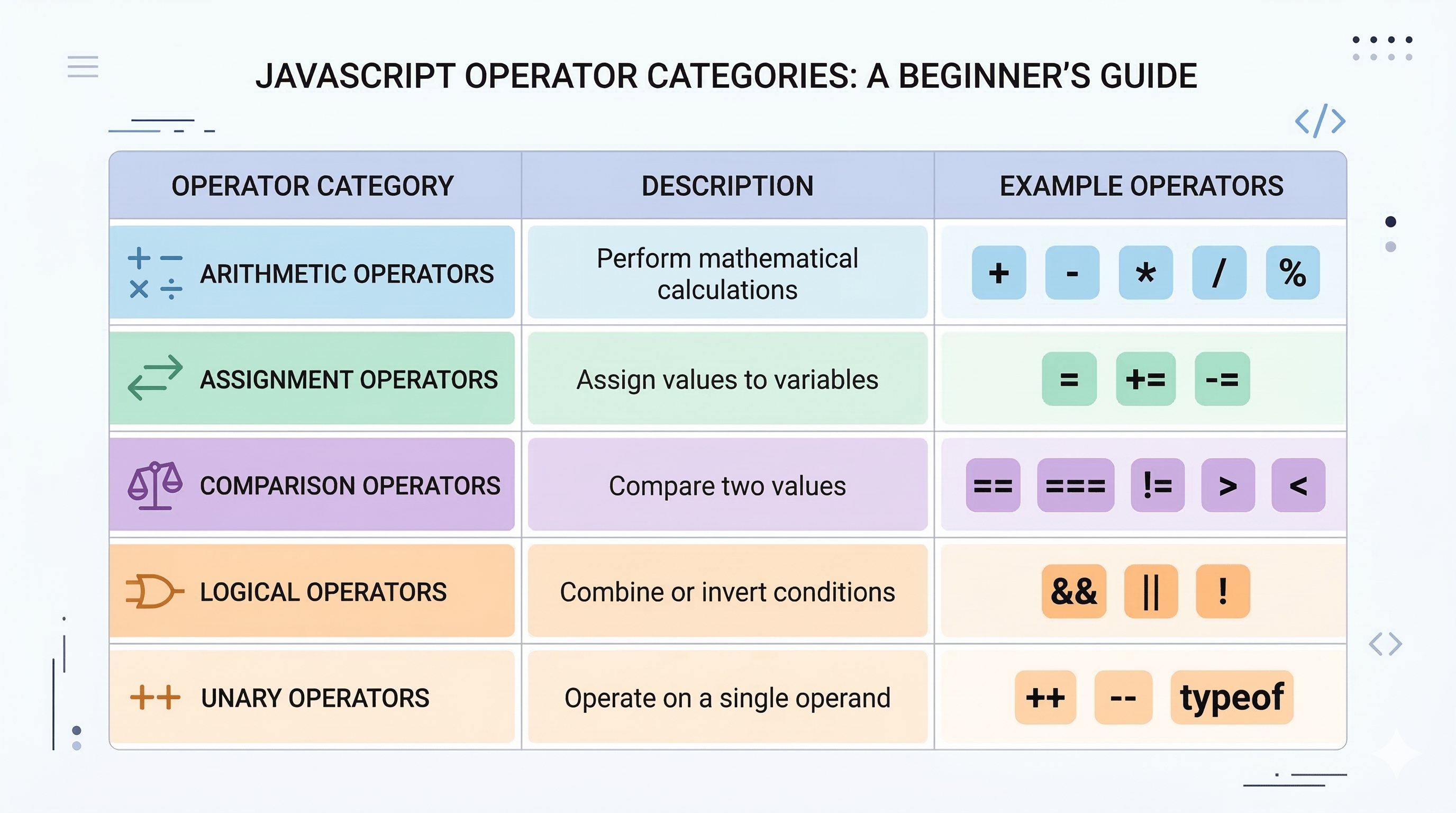
Arithmetic operators includes +, -, *, /, % and are hte most commonly used operators. It is used to do basic mathematical operations like addition, subtraction and mutlipication etc .
let a = 5;
let b = 10;

console.log(a + b) // output = 15, add the values
console.log(b - a) // output = 5, subtracts the values
console.log(a * b) // output = 50, multiplies them
console.log(b / a) // output = 0, gives quotient
console.log(a % b) // output = 5, gives remainder
Comparison operators
Comparison operators are ==, ===, !=, >, < and it compares to the values and return the Boolean value . It returns true of the comparisons turns out to be true, otherwise false.
let a = 1;

console.log(a == '1')
// true, double equals checks the values

console.log(a === '1')
// false, because a is number and c is string, triple equals checks the values along with with data types

console.log(a != 4)
// true, because the statement is true

console.log(a > 4)
// false, because a is smaller than b

console.log(a < 4)
// true, because a is smaller than b

console.log(a <= 1)
// true, because 1 is equals to a
Logical operators
- Logical AND (&&)
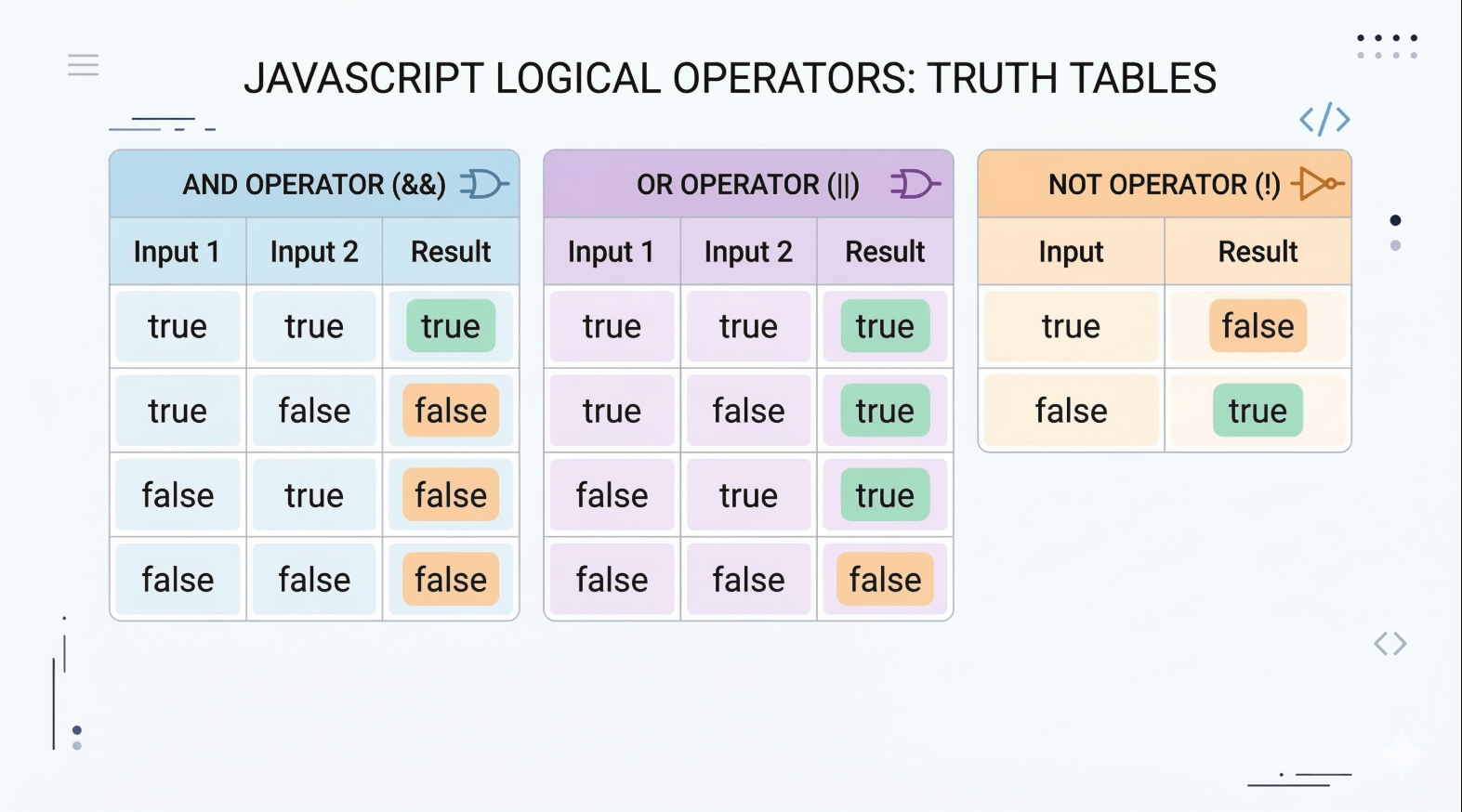
The AND operator returns true only when both conditions are true.
A | B | A && B |
true | true | true |
true | false | false |
false | true | false |
false | false | false |
Both conditions must be true for the result to be true.
let age = 20;
let hasID = true;

if(age >= 18 && hasID){
    console.log("Allowed");
}
- Logical OR (||)
The OR operator returns true if at least one condition is true.
A | B |
| A || B |
true | true |
| true |
true | false |
| true |
false | true |
| true |
false | false |
| false |
If any one condition is true, the result becomes true.
let isAdmin = false;
let isOwner = true;

if(isAdmin || isOwner){
    console.log("Access granted");
}
- Logical NOT (!)
The NOT (!) operator reverses the Boolean value. We can use this operator when we need to check the reversed or opposite value.
A | !A |
true | false |
false | true |
It simply flips the value.
let isLoggedIn = false;

if(!isLoggedIn){
    console.log("Please log in");
}
Assignment operators
Assignment operators are =, +=, -= . This operator assigns the value, we use it in the process of declaring of variables.
let name = ‘mehtab
let haveGirlfriend = false
Now assume we have a an age = 18 , we need to increase or decrease it
We can say that
age = age + 1 // age will be redeclare with adding one to it
And since programmer are so lazy they made a shorthand notation for it, now we can use
age -= 2 // decrease by 2
age += 5 // increase by 5
And we want to increase it by only one we can do it like this
age++; // increased value for the next time we use it
age--; // decreased value for the next time we use it
Conclusion
In this article, we explored what are operators and how they can be useful and also important while working with data. Operators allows developers to assign values, perform calculation etc.
We understood different types of operators like arithmetic, comparison, logical operators.
As we will move forward in our journey we will be using them for mathematical calculations and if we will practice it more, that will help us being more comfortable and confident .


